How to customize the fonts and colors of the domain data table
Your own CSS for domain table rows and columns
You can use your own css to style the contents of the domain data tables.
To do this open the file 'custom-sample.css' in the 'lib/css' folder and rename it to 'custom.css'
Read the instructions at the top of the file and add your css to the 'custom.css' file. Save and upload.
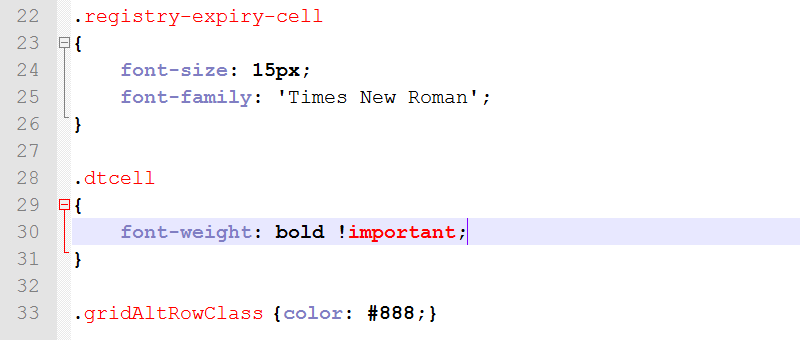
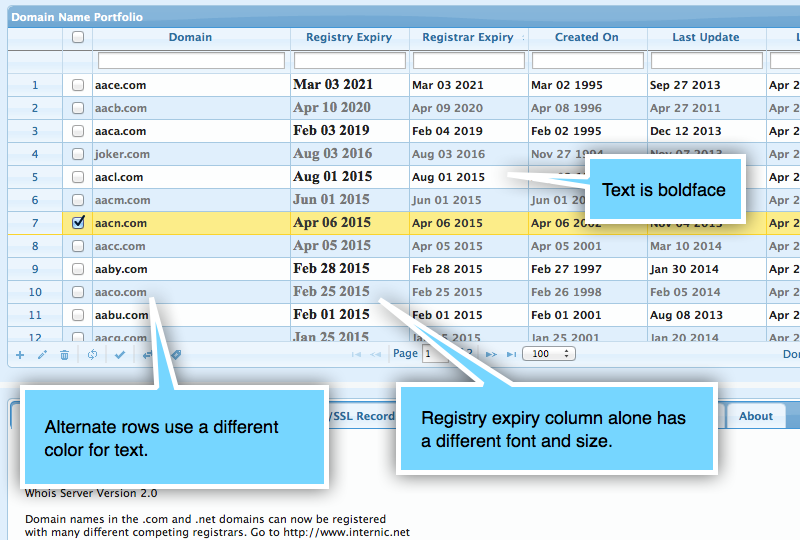
The above settings will cause...
- The 'registry expiry' column to use a different font.
- All the domain table entries to be in bold text.
- Text in alternate rows to use a different color.
More information on CSS class names
- The class
dtcellcan be used to specify css for domain table. - The class
dccellcan be used to specify css for domain category table. - The class
aqcellcan be used to specify css for auto query table. - To specify css for a specific column, append
-cellto it's name. If a column field has underscores, replace with hyphen (-), For example, registrar_expiry will become registrar-expiry-cell. - The class
gridAltRowClasscan be used to style the alternate rows in domain table. - The class
catGridAltRowClasscan be used to style the alternate rows in category and auto-query tables.
Watch My Domains SED v2
This user-guide is for an older version of the application. The user guide for the current version 4 is available here.
Current Version User Guide (v4)
- User Guide Home
- Download & Installation
- The Cron Job
- Troubleshoot the Installation
- Adding & Removing Domains
- Uploading CSV Data
- Handling Domain Lookups
- Managing Domain Categories
- Domain Display Filters
- SSL Checking for Sub Domains
- Subdomain Manager
- Custom Data Columns
- Whois Configuration
- Whois Extraction Tokens
- Report Generation
- Enable Email Alerts
- Download CSV Reports
- Advanced Search for Reports
- Manually Editing Data
- Password Protect the Application
- Create and Administer Users
- Refresh Domain Data at Regular Intervals
- Monitor Domain Home Page for Text Tokens
- Specify what Lookups should happen by default
- Branding the Installation
- Customize Colors and Font of Domain Table
- How to backup the MySQL database
- Install on Multiple Servers (Pro)
- Auto-Update on Multiple Servers (Pro)
- Custom Auto Queries
- License Code Setup - Std Edition
- Screen Shots - Themes
- Frequently Asked Questions


A credit card is not required for downloading the trial version.